

bitLoyalty vs Smile.io
Let returning shoppers choose an eligible reward in chat and apply it to their Shopify order. If members also redeem at the till, verify your POS rewards before switching.
 Install bitLoyalty
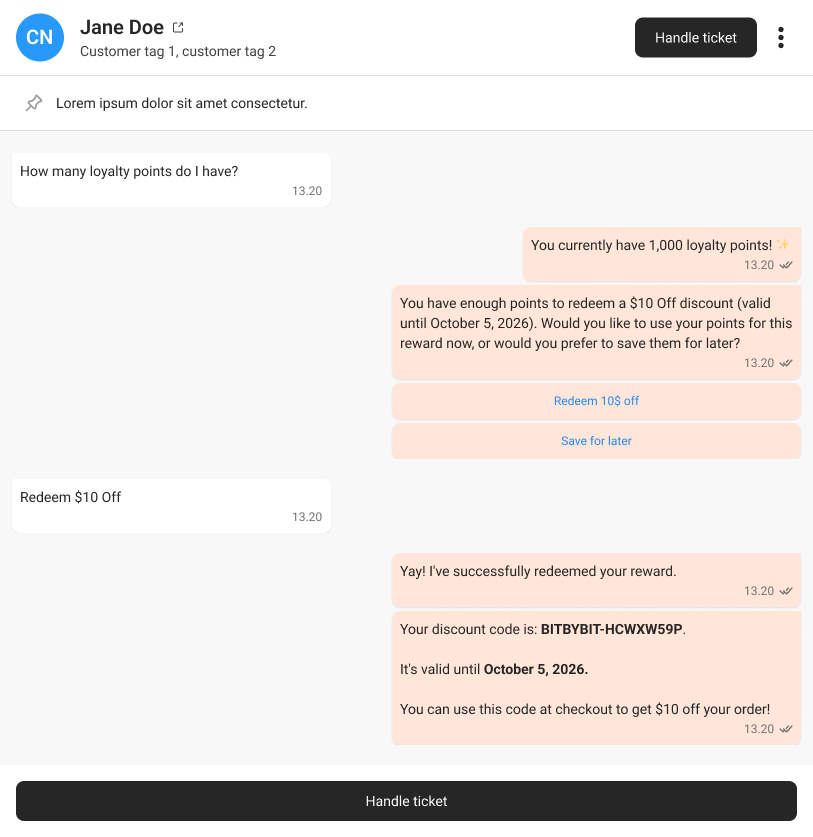
In this documentation example, a recognized shopper checks points, chooses a reward and gets a code in chat. They enter it at Shopify checkout. Redemption guide
Should you switch to bitLoyalty?
Choose bitLoyalty if most rewards are redeemed online and your team already gets points questions in chat. Shoppers can check their balance, choose a reward and get a voucher for Shopify checkout.
Pick Smile.io if your store earns repeat sales in person and you need eligible rewards at Shopify POS.
Before you choose:Compare both tools with the same online basket and reward value. Verify Shopify POS separately if your store relies on it.
Compare the work your team needs.
Compare points, online vouchers issued in chat and the workflow your current program depends on. Follow the sources in each row to check the setup and plan.
| What we compared | Smile.io | bitLoyalty | Why it matters |
|---|---|---|---|
| Points and rewards for Shopify purchases | The Shopify listing documents points and rewards.Smile Shopify listing | Set earning rules and configure rewards for eligible orders.bitLoyalty setup | Check one qualifying purchase and the effect of refunding it. |
| Smile.io: The Shopify listing documents points and rewards.bitLoyalty: Set earning rules and configure rewards for eligible orders.Points and rewards for Shopify purchases — why it matters: Check one qualifying purchase and the effect of refunding it. | |||
| AI checks the balance and issues a voucher in chat | Ask the vendor to show a balance lookup, reward choice and voucher issuance in the same chat. | Requires a connected Shopify store, enabled loyalty, a recognized customer and the customer’s reward choice. The shopper uses the voucher at checkout.bitLoyalty redemption guide | Try one customer with enough points and one with too few. |
| Smile.io: Ask the vendor to show a balance lookup, reward choice and voucher issuance in the same chat.bitLoyalty: Requires a connected Shopify store, enabled loyalty, a recognized customer and the customer’s reward choice. The shopper uses the voucher at checkout.AI checks the balance and issues a voucher in chat — why it matters: Try one customer with enough points and one with too few. | |||
| Reward redemption at Shopify POS | Smile documents reward types for POS. Check the exact reward and plan.Smile reward types and Shopify POS | The documented chat voucher is for Shopify online checkout. Confirm any separate POS workflow your stores need. | Ask a cashier to redeem the reward you advertise online. |
| Smile.io: Smile documents reward types for POS. Check the exact reward and plan.bitLoyalty: The documented chat voucher is for Shopify online checkout. Confirm any separate POS workflow your stores need.Reward redemption at Shopify POS — why it matters: Ask a cashier to redeem the reward you advertise online. | |||
See the voucher redemption steps · See the Shopify loyalty shortlist
Where do your customers actually use their points?
If the cashier is where members redeem most often, start by testing the Smile rewards your stores already honor. When shoppers pause an online purchase to ask about points, bitLoyalty answers in chat and issues the chosen reward to a recognized customer in a supported Shopify setup. Compare both tools on an online order first. If members also redeem in person, verify Shopify POS separately.
What will your rewards program cost?
Check the order allowance and the tier that covers your required POS and rewards features. Compare against the current bitLoyalty allowance and any AI or WhatsApp usage your workflow needs. Smile Shopify listing · bitbybit pricing
Use the same busiest-month order volume and reward value for both options. Count plan upgrades, usage charges and the cost of any tools you would keep.
How do you switch from Smile.io to bitLoyalty?
Before leaving Smile.io, confirm how you will bring over available balances and honor rewards your members already use. If your stores redeem rewards at the till, test the same reward in Shopify POS before announcing a switch.
| What to check | Before you switch |
|---|---|
| Available points | Prepare a sample of available balances. Ask the bitLoyalty team how those records can be matched to Shopify customers and confirm how you will handle upcoming expiries. |
| Unused rewards | List active discounts and agree which ones your website and cashiers will honor through the change. Give support the same guidance. |
| Online and in-store redemption | Apply one voucher issued in chat to an online test order. If POS matters, separately verify the actual in-store redemption method and discount. |
Common questions about switching from Smile.io
Can Shopify customers use their points at the till and in chat?
Smile documents eligible rewards at Shopify POS. bitLoyalty lets recognized customers in a supported Shopify setup choose a reward in chat and enter its voucher at online checkout. For POS, verify the exact reward and plan with a cashier.
What should I test when comparing Smile.io and bitLoyalty?
Compare both tools with the same online basket and reward value. Verify Shopify POS separately if your store relies on it.
Can I move my program from Smile.io to bitLoyalty?
Choose Other app → Contact us in bitLoyalty’s import selection. Bring a sample of member balances and a list of the rewards you need online and at POS. Discuss your migration
Do Shopify shoppers need to open a loyalty widget to choose a bitLoyalty reward?
Shoppers can choose the reward in chat when the Shopify store is connected, loyalty is enabled and they are recognized as a customer. bitLoyalty sends the voucher in the conversation. Shoppers enter it at online checkout. bitLoyalty redemption guide
Also evaluating these?
Explore other tools for related jobs:
How this comparison is built
We link the public product and pricing information used in this comparison. Plan-dependent capabilities and workflows we have not verified are labeled separately. Confirm current terms and test your required actions before deciding.
Last reviewed: 2026-11-23 · Spot something out of date? Email [email protected] — we’ll fix within a week.
Try bitLoyalty on your Shopify store.
Set up one reward and test the balance, voucher and checkout with a returning customer.