

bitLoyalty vs Okendo
Help returning Shopify shoppers spend earned points when they ask in chat. If reviews earn points in your store, confirm how that earning rule will work before you switch.
 Install bitLoyalty
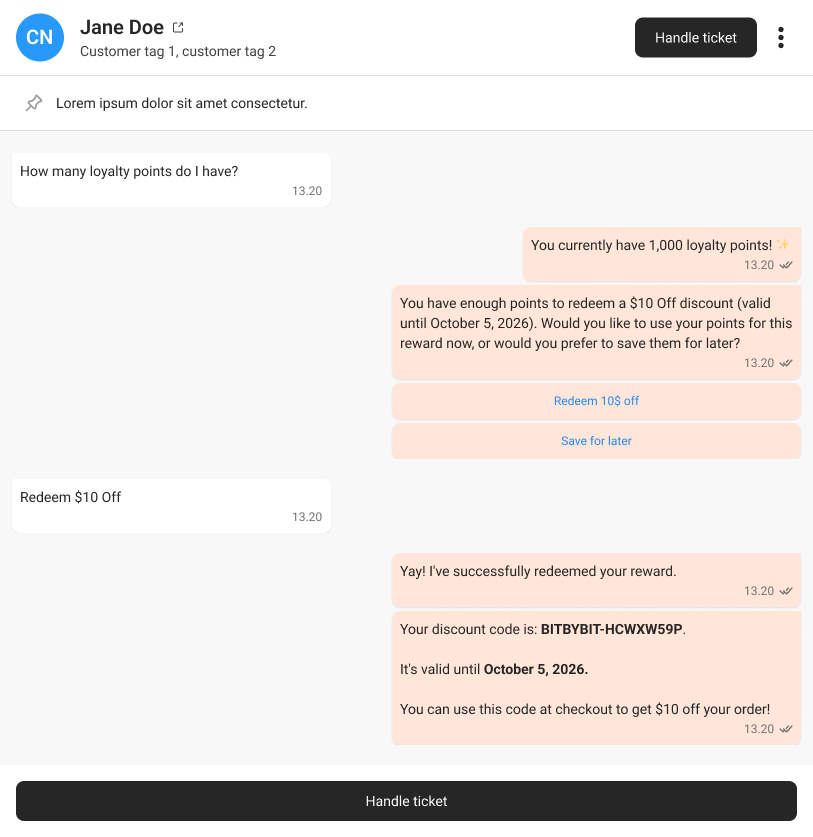
In this documentation example, a recognized shopper checks points, chooses a reward and gets a code in chat. They enter it at Shopify checkout. Redemption guide
Should you switch to bitLoyalty?
Choose bitLoyalty if most points come from purchases and shoppers already ask about rewards in chat. The agent shows eligible rewards and sends the chosen voucher for Shopify checkout.
Pick Okendo if you use eligible product reviews as a loyalty earning event and your team depends on the existing Okendo workflow.
Before you choose:Submit an eligible test review and check whether the member’s balance changes. Then have that shopper check their balance and redeem at Shopify checkout.
Compare the work your team needs.
Compare points, online vouchers issued in chat and the workflow your current program depends on. Follow the sources in each row to check the setup and plan.
| What we compared | Okendo | bitLoyalty | Why it matters |
|---|---|---|---|
| Points and rewards for Shopify purchases | The Shopify listing documents points and rewards.Okendo Shopify listing | Set earning rules and configure rewards for eligible orders.bitLoyalty setup | Check one qualifying purchase and the effect of refunding it. |
| Okendo: The Shopify listing documents points and rewards.bitLoyalty: Set earning rules and configure rewards for eligible orders.Points and rewards for Shopify purchases — why it matters: Check one qualifying purchase and the effect of refunding it. | |||
| AI checks the balance and issues a voucher in chat | Ask the vendor to show a balance lookup, reward choice and voucher issuance in the same chat. | Requires a connected Shopify store, enabled loyalty, a recognized customer and the customer’s reward choice. The shopper uses the voucher at checkout.bitLoyalty redemption guide | Try one customer with enough points and one with too few. |
| Okendo: Ask the vendor to show a balance lookup, reward choice and voucher issuance in the same chat.bitLoyalty: Requires a connected Shopify store, enabled loyalty, a recognized customer and the customer’s reward choice. The shopper uses the voucher at checkout.AI checks the balance and issues a voucher in chat — why it matters: Try one customer with enough points and one with too few. | |||
| Points for eligible product reviews | Okendo documents rules and conditions for earning reward currency from reviews.Okendo earning and redemption rules | Verify separately how reviews are collected and how eligible reviews will add points to the spendable balance. | Check which review request path triggers points before changing your program. |
| Okendo: Okendo documents rules and conditions for earning reward currency from reviews.bitLoyalty: Verify separately how reviews are collected and how eligible reviews will add points to the spendable balance.Points for eligible product reviews — why it matters: Check which review request path triggers points before changing your program. | |||
See the voucher redemption steps · See the Shopify loyalty shortlist
Do your customers get their points from reviews or from purchases?
Start with the earning rule. If an eligible product review is an important way to earn points, verify that route in Okendo before moving the program. When customers mainly earn on purchases and ask what their points are worth, bitLoyalty shows a recognized member in a supported Shopify setup what they can redeem in chat.
What will your rewards program cost?
Verify which Okendo modules your team needs for reviews and loyalty, and what you would continue paying for if you move the loyalty program. Compare against the current bitLoyalty allowance and any AI or WhatsApp usage your workflow needs. Okendo Shopify listing · bitbybit pricing
Use the same busiest-month order volume and reward value for both options. Count plan upgrades, usage charges and the cost of any tools you would keep.
How do you switch from Okendo to bitLoyalty?
Before changing Okendo Loyalty, decide who owns review requests and points earned from reviews. Treat those workflows and the transfer of existing point balances as separate decisions.
| What to check | Before you switch |
|---|---|
| Available points | Prepare a sample of member balances for the bitLoyalty team. Include a member who recently earned points from a review and verify the total. |
| Reviews and future points | Check which tool will collect and display reviews and award points for an eligible review. Confirm that the new points reach the balance members can actually spend. |
| Next purchase | Use a verified bitLoyalty balance to issue a voucher in chat. Check the discount on the Shopify order and agree who resolves any earning or redemption discrepancy. |
Common questions about switching from Okendo
What should I check if my customers earn points from product reviews?
Use an eligible test review to verify who earns points and when. Confirm how that earning rule will feed the balance customers spend before you switch the rewards program.
What should I test when comparing Okendo and bitLoyalty?
Submit an eligible test review and check whether the member’s balance changes. Then have that shopper check their balance and redeem at Shopify checkout.
Can I move my program from Okendo to bitLoyalty?
Choose Other app → Contact us in bitLoyalty’s import selection. Bring sample loyalty records and confirm how your review requests and balances will be handled. Discuss your migration
Does a shopper have to submit a review to choose a voucher in chat?
A recognized Shopify customer can choose a voucher in bitLoyalty chat when they have an eligible points balance and loyalty is enabled. If reviews award points in your program, verify that eligible review points reach that balance. bitLoyalty redemption guide
Also evaluating these?
Explore other tools for related jobs:
How this comparison is built
We link the public product and pricing information used in this comparison. Plan-dependent capabilities and workflows we have not verified are labeled separately. Confirm current terms and test your required actions before deciding.
Last reviewed: 2026-11-23 · Spot something out of date? Email [email protected] — we’ll fix within a week.
Try bitLoyalty on your Shopify store.
Set up one reward and test the balance, voucher and checkout with a returning customer.