 Install on Shopify
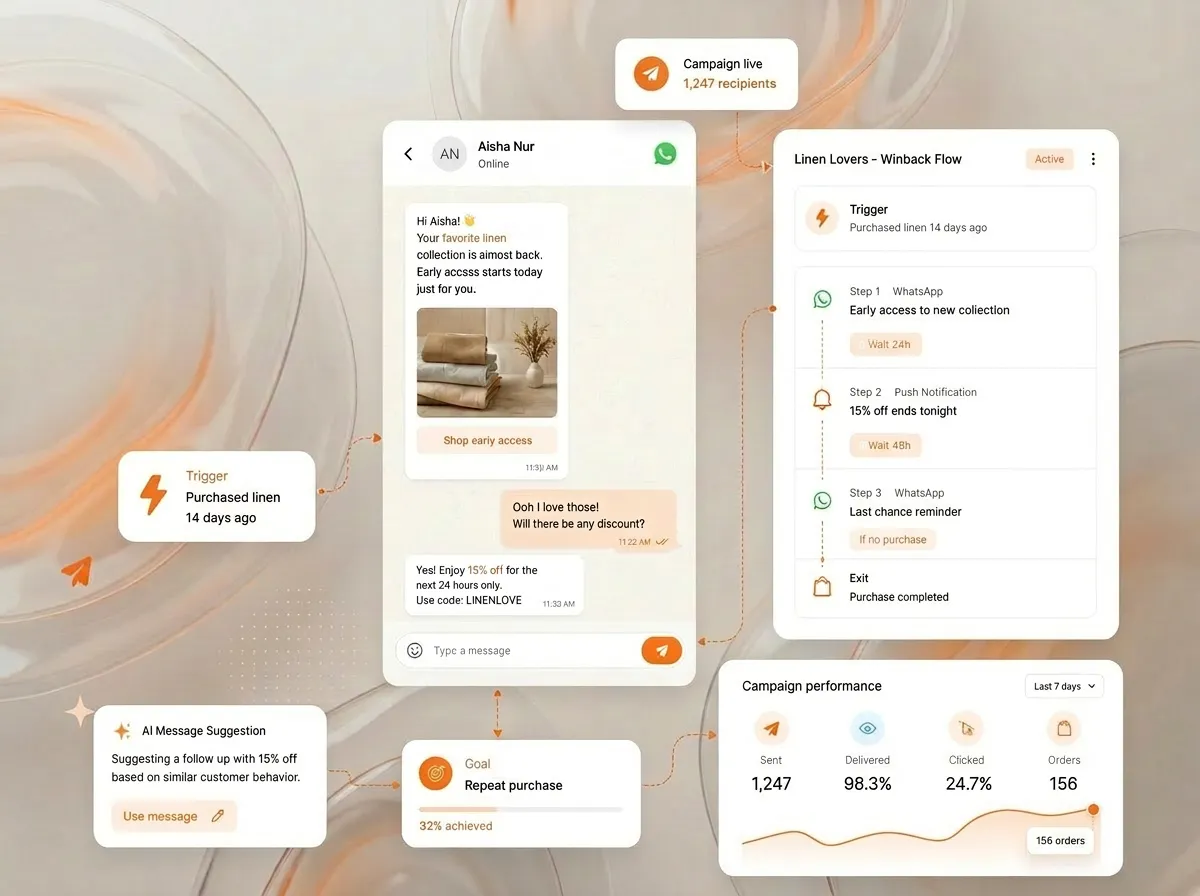
Describe the audience; the AI builds the segment from your live Shopify data. Then it drafts the message, on-brand, ready to send.
bitCRM
AI marketing automation that knows what to send — and when.
Build customer relationships from every conversation. bitCRM turns Shopify orders, chats, tags, and customer signals into segments and follow-ups — so your AI knows who to message, what to say, and when to send it.
- What to sendthe AI builds the segment from your live Shopify data — or bitbybit Commerce, for brands not on Shopify — then drafts the message
- When to sendit fires on a real signal, when the customer is most likely to open
- Where they areWhatsApp and mobile push, from one record you own
Works withWhatsAppShopifyInstagramFacebookGoogle SheetsMeta CAPIOpen APIStampedYotpoWebhooksCustom API
Trusted by 1,000+ brands across support, commerce, and lifecycle journeys
















What the record does
One recordevery chat, order, and signal, in one profile
Auto-taggedby intent, lifecycle, and source
On signalfollow-ups fire on real behaviour, not a calendar
AI-draftedcart recovery, reorder, and win-back
Marketing automation
Two jobs: what to send, and when.
Email gets ignored; ads cost you on every click. WhatsApp gets opened in minutes — so that’s where bitCRM works. The AI does both jobs: it builds the segment, drafts the message, and fires on a real signal — then writes it all back to a record you own.
It fires on a real signal — reorder due, cart abandoned, a quiet stretch — at the moment they’re most likely to open. Not a calendar.
WhatsApp and mobile push, where messages get opened in minutes — sent on your own number, not a rented one.
Every send writes back to one customer profile — exportable, owned, never a rented audience inside someone else’s ad platform.
How it works
From first message to the next sale.
A stranger messages once — the AI turns it into a tagged record, a live segment, a sent message, and tracked revenue. Here’s each step.
Conversation, order, tag→One record→Segment→Follow-up
ChannelWhatsApp
SourceClick-to-WhatsApp
First message“Is this in stock?”
01
Capture & unify
Every contact, order, and conversation lands on one customer record — tagged automatically.
ANDtag is high-intent
ANDvisited vitamin C serum
NOTtag is purchased
Recipients2,847 ↑ live
02
Tag & segment
Build segments from AND/OR/NOT conditions on tags, AI tags, visited pages, and metafields — with a live recipient count.
Hi {{name}} 👋 Your serum is back in stock. EARLY15
Delivered2,640
Read2,061
Replied418
03
Reach
Broadcast to a segment with a template, dynamic variables, and an attached voucher — then watch per-recipient status live.
Trigger→Condition→Delay→Send
Attributed revenuetracked per flow
04
Automate & track
Drag-and-drop flows: trigger on a Shopify event, branch, delay, then send — and see the revenue attributed back.
Qualify & segment
Qualify and segment every lead, while it’s warm.
The moment someone shows interest, the AI answers, qualifies them in a natural conversation, and tags the lead on the record — then routes the hottest to the right rep. Closing the lead in the thread is the sales job →
- Answers the instant interest shows — no lead sits cooling in a queue waiting for a reply
- Qualifies in conversation, not a form — it asks what it needs to know the way a good rep would
- Qualifies and segments automatically — by intent and lifecycle stage, written to the record as the chat unfolds
- Routes hot leads to the right rep — handed off with the full context already attached
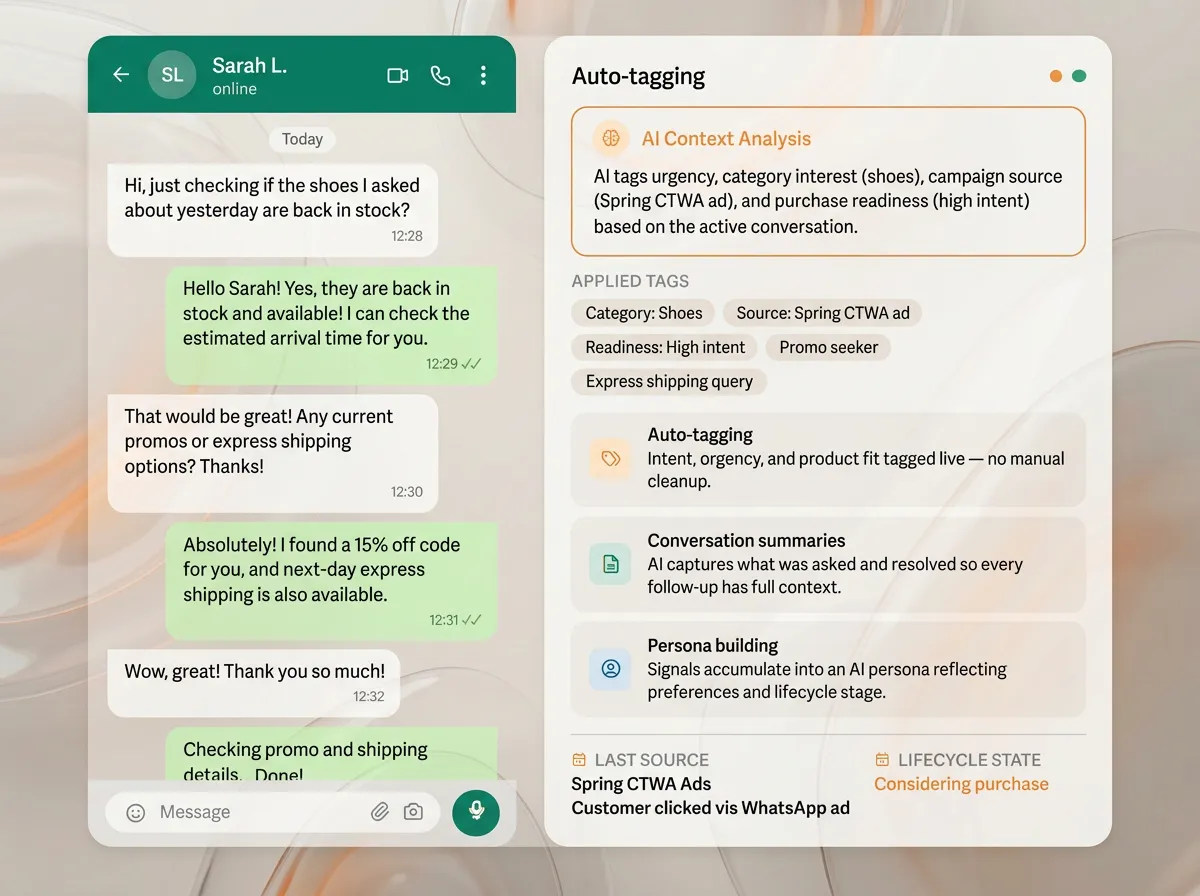
The AI qualifies in conversation, tags the lead, and routes the hottest ones.
Outbound
Reach out first, on the channel leads actually read.
Don’t wait for customers to come back. The AI follows up on a stalled cart, re-engages cold leads, and checks in after a purchase — proactively, on WhatsApp, with approved templates. Every reply continues as a two-way conversation, never a dead-end broadcast.
- Proactive outbound on WhatsApp — follow a stalled cart, re-engage cold leads, check in after purchase
- Power Message keeps it two-way — each reply opens a real conversation, not a one-shot blast
- Approved WhatsApp templates — open the conversation inside Meta’s outbound rules
- Sent from the record — every touch is keyed to that customer’s history, not a generic list
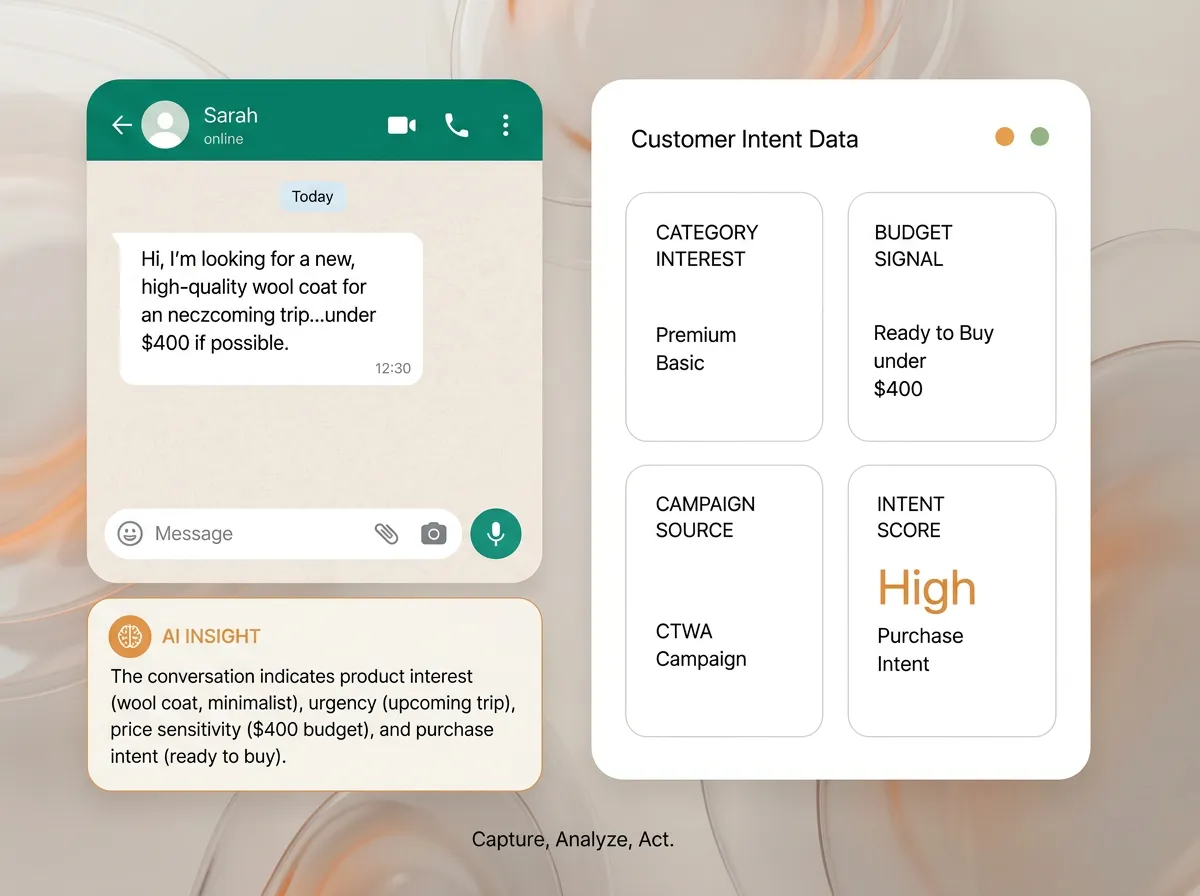
Reach out first — and every reply continues as a conversation.
One audience, every send
Reach every customer where they actually are.
WhatsApp and mobile push, in one campaign builder. The AI picks the moment — and the channel that pays back: WhatsApp when it earns the message fee, push when it doesn’t.
- Multi-step flows across WhatsApp and mobile push — triggered by live behaviour, not a fixed calendar.
- One campaign builder — design the broadcast once, send it across WhatsApp and mobile push.
- AI segmentation — describe the audience, the AI builds it from your live Shopify data.
- The AI picks the moment — it fires on a real signal, when the customer is most likely to open.
- Meta CAPI closes the loop — conversions flow back to Meta, so your targeting and retargeting stay honest. How the loop closes from chat back to ad spend →
Powered by AI Studio and your live Shopify data.
Watch it happen
One WhatsApp chat builds the full customer record.
One chat. The AI tags the customer, adds them to a live segment, and lines up the next message — automatically.
Dewi A.online · new contact
Hi! Is the vitamin C serum okay for sensitive skin?
Hi Dewi! Yes — it’s our gentlest formula, fragrance-free. Want me to send the full ingredient list?
Yes please. Might order later this week 🙏
Watch the AI build the record from one chat — then drop the customer into a live segment.
The basics, run by AI
Broadcasts, automations, templates — run by the AI.
Broadcasts, automations, templates — every WhatsApp marketing tool has these. The difference is the AI choosing the audience, drafting the message, and firing on the signal.
Proactive selling — qualify, recommend, close in the thread — is the sales job →Campaigns
Send to the right 1,000. Not everyone.
Pick a live segment, compose, schedule. Built on fresh behavior, not last week’s export.
- Segment-based targeting
- Composer with WhatsApp preview
- Schedule or send now
- Reach and revenue estimates
Automation Flows
Lifecycle moments that run themselves.
Set a trigger; build branching sequences. Each path sends the right message at the right moment — no code.
- Triggers from Shopify events — placed, fulfilled, delivered, refunded
- Triggers from on-site activity — viewed product, abandoned cart
- Follows up on a real signal — reorder, win-back, upgrade — fired on the signal, not a calendar
- Multi-step sequences across WhatsApp and push
Reviews & Retention
Ask for the review, then earn the repeat order.
After a resolved order, the flow asks for a review via Stamped or Yotpo — then thanks them with a voucher.
- Auto-request a review via Stamped or Yotpo
- Follow with a thank-you voucher
- Reorder nudge before they run out; win-back when they go quiet
- Every touch sent from the individual record
Campaign Builder
High-Intent Buyers2,847 contacts
— Recent Purchasers
Hi! 👋 Your favorite items are back in stock. Early access for you — use code EARLY15
Automation Flow
TriggerAbandoned Cart
Wait1 hour
Send MessageWhatsApp↓ Delivered
Conditional SplitCustomer engaged?
YES
Follow-up sequence
NO
End
Review & Retention Flow
TriggerOrder Delivered
Wait3 days
Request Reviewvia Stamped / Yotpo↓ Sent on WhatsApp
Conditional SplitReview submitted?
YES
Thank-you voucher
NO
Gentle reminder
Control
You approve before it sends.
Test as a real customer in the Playground before go-live
Preview every message before it sends — approved Meta templates only
It escalates instead of guessing — never invents a price or policy
Your customer data stays in your workspace, exportable anytime
For teams
Reps leave. The relationship stays.
When a rep resigns, the customers usually walk out too — they lived on a personal phone, never a company record. bitCRM keeps every relationship on one company-owned record, keyed to the customer’s number.
$299/mo (≈ Rp 5jt) for the full bundle — under Jakarta’s minimum wage (UMR), and the record never resigns.
Chat with our team on WhatsApp · +62 877 5529 9328One agent, one loop
Build → resolve → remember → follow up.
One agent moves through the whole journey: built in AI Studio, live in bitChat, remembered in bitCRM, and following up on real customer signals.
01BuildAI StudioBuild the agent once: knowledge, skills, guardrails, tested in the Playground.02ResolvebitChatAnswer, recommend, take orders, and hand off with context — in the thread.
You are here03RememberbitCRMEvery conversation and order saves to one customer record.
04Follow upMarketing + SalesCart recovery, reorder, win-back, and sales follow-up — triggered by real signals. Marketing → Sales →
Depth, not reach
The smarter way to run lifecycle marketing.
The email-era way is a list you blast on a schedule, built only after purchase, stranded on whoever’s phone took the chat.
| Capability | Without bitCRM | bitCRM |
|---|---|---|
| The goal | A bigger list to blast. | Segments that convert and flows that grow revenue. |
| Customer record | Appears only after a purchase or form. Non-buyers stay invisible. | Builds itself from the first conversation — before anyone buys. |
| Data upkeep | Tags, notes, and segments need manual setup and cleanup. | Auto-tagged and summarised as conversations unfold. |
| Who’s in it | Known buyers only. | Everyone who talks to you — owned, and reachable on WhatsApp. |
| Messaging | One blast to the whole list on a schedule. | Triggered from the record, fired on a real signal — to a live segment. |
| Continuity | History walks out on whoever’s phone took the chat. | One company-owned record; survives staff changes. |
Built on
Built on WhatsApp Cloud API and the Business App (COEX) as an Official Meta Tech Partner, and a Shopify Partner — your number scales with the team, never at risk.
Official Meta Tech PartnerWhatsApp Cloud API + Business App (COEX)
Shopify PartnerBuilt and billed on Shopify
With your data
What bitCRM does with your data.
- Build customer records
- Create segments
- Trigger cart recovery
- Trigger reorder flows
- Trigger win-back flows
- Draft follow-up messages
- Use tags and customer signals
- Connect orders, chats, and follow-up history
FAQ
Questions about bitCRM.
Will my WhatsApp number get blocked sending broadcasts?
bitCRM sends broadcasts through the official WhatsApp Cloud API as an Official Meta Tech Partner — not blasts from a personal number, which is what gets numbers banned. Messages go to opted-in contacts using Meta-approved template categories, which keeps your WhatsApp Business account in good standing. Following Meta’s rules lowers the risk; no platform can guarantee zero blocks.
How is bitCRM different from email marketing tools?
Email marketing tools are built around inbox delivery and a fixed send calendar. bitCRM is built around conversations, where customer signals arrive the moment they happen: tags, summaries, and personas form automatically from the thread itself, segments update as behavior unfolds — not after a weekly sync — and sends start from intent and a real signal, not a list and a date.
Will my customers feel spammed?
No — that’s the whole point of sending from the record. bitCRM doesn’t blast a list; it messages from the individual profile, triggered by a real signal (a reorder due, a question left open, a quiet stretch), on a channel people keep for those they trust. Fewer messages, each one relevant — which is what keeps a relationship intact instead of training people to mute you.
Do I own the customer data?
Yes — every customer record bitCRM builds is yours. Profiles live in your workspace on your own WhatsApp number, export cleanly whenever you want, and you can reach every contact directly. It isn’t a rented audience sitting inside someone else’s ad platform — the list, the history, and the relationship stay with you.
Can bitCRM capture customers who haven’t purchased yet?
Yes — capturing pre-purchase customers is one of bitCRM’s biggest differences from traditional CRM tools. When someone messages your WhatsApp (through a CTWA ad, an inbound question, or a support conversation), bitCRM creates or updates their record immediately. Prospects who browse, ask, or engage before buying are captured, tagged, and segmented — so your reachable customer base is much larger than just past purchasers.
What does AI tagging actually do in practice?
As conversations happen, bitCRM’s AI reads the thread and assigns structured tags — product-category interest, purchase-intent level, ad source, lifecycle stage, and more. It also writes a conversation summary, so the next time your team or a deployed agent picks up that customer, the full context is already there. You get usable CRM data without manual entry or cleanup.
What is Power Message and how is it different from a broadcast?
A broadcast goes to a list on a schedule. bitCRM’s Power Message triggers from a real customer signal — last order date, engagement history, lifecycle stage, product interest — and personalises each message from the actual customer record, sent when the signal says the moment is right. Every reply continues as a two-way conversation, so you send fewer messages and more of them land.
See WhatsApp Marketing in full →Does the AI write the WhatsApp message copy for me?
Yes — bitCRM drafts the WhatsApp message for you. Give it the audience, the offer, and the language, and the AI writes an on-brand draft ready to send; you edit every word before it goes out. The same applies to your reusable WhatsApp templates, so a broadcast starts from a strong first draft instead of a blank composer.
Build a WhatsApp message template →How does Meta CAPI tie WhatsApp sends back to ad spend?
Click-to-WhatsApp ads bring the ad headline, image, and source into bitCRM, attached to the customer record. The Meta Conversion API (CAPI) then sends the conversions that happen in WhatsApp back to Meta — down to the ad account, campaign, ad set, and ad — so you see which ads actually drove conversations and revenue, and Meta retargets on real outcomes instead of guesses.
Can bitCRM reach customers beyond WhatsApp?
Yes — bitCRM drives WhatsApp and mobile push from the same customer record and segmentation logic: design the broadcast once and send it across both. Email and SMS are rolling out as delivery fallbacks. Re-engagement isn’t limited to a single surface, so you reach each customer where they actually are.
How is bitCRM priced?
bitCRM is a flat platform fee per workspace, per month: a Free plan to start, then Starter at $9/mo and Growth at $39/mo, both with a 7-day free trial — or the $299/mo Pro Bundle with every bitbybit product included. WhatsApp fees pass through at Meta’s published rates with no platform markup.
See bitCRM pricing →What integrations does bitCRM support?
bitCRM connects to Shopify out of the box, and extends through open, no-code rails: a Custom Webhook trigger (with a live test) to fire on your own events, a Save to Google Sheets action to log signals to a spreadsheet, and an HTTP Request action to push to any internal system or endpoint. Meta Conversion API closes the loop back to your ads. For anything bespoke, the open API and standard webhooks cover most scenarios without custom development.
Guide: connect bitCRM to Make.com →The right message, the right moment — more repeat revenue.
The AI builds your segments, drafts the message, and fires on the real moment — all from one customer record you own, on the channel customers actually open.
No credit card requiredFree 7-day trialCancel anytime